
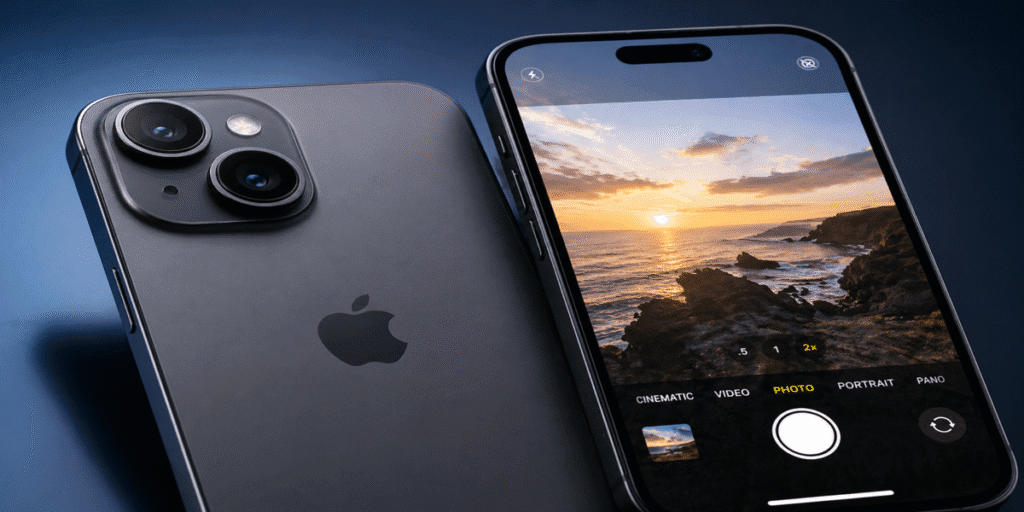
Ever taken a photo with your phone and thought, “That looks nothing like what I actually saw”? You are not alone. Most people upgrade to a newer iPhone, hoping for better photos and then use it on full auto without ever unlocking what the camera can actually do. The iPhone 17 is packed with genuinely impressive camera technology, but it rewards people who know where to look.
Whether you are a hobbyist chasing golden hour shots on the Adelaide coastline, a small business owner photographing products, or just someone who wants their family moments to look incredible, this guide covers every key camera feature on the iPhone 17 that will actually make a difference to your photos. No jargon. Just clear, practical knowledge.
What Makes the iPhone 17 Camera Different?
The iPhone 17 launched in September 2025 with a completely rethought rear camera system. Where previous base models leaned heavily on a single primary lens, the iPhone 17 introduces what Apple calls a 48MP Dual Fusion camera system, two 48-megapixel lenses working together in a way that was previously reserved for the Pro range.
The main camera is a 48MP Sony IMX904 sensor with an f/1.6 aperture sitting at 26mm. The ultra-wide is a 48MP Sony IMX972 sensor at 13mm and f/2.2 with a 120-degree field of view. The front camera is an 18MP Sony IMX914 with optical image stabilisation and phase-detection autofocus, the first time OIS has appeared on a front camera in a non-Pro iPhone.
Driving all of this is the A19 chip, built on third-generation 3-nanometer technology. The A19’s image signal processor and 16-core Apple Neural Engine work continuously in the background, managing exposure, tone, colour science, and noise reduction in real time before you even press the shutter. For users seeking iPhone repair in Adelaide, understanding these advanced components can help in choosing the right service for maintenance and fixes.
The 48MP Dual Fusion System and Optical-Quality 2x Zoom
The 48MP Fusion Main camera is the standout piece of hardware on the iPhone 17. The f/1.6 aperture is one of the widest ever placed on a non-Pro smartphone, which means significantly more light reaches the sensor compared to older iPhone models. That translates directly into sharper low-light photos and richer colour in everyday shooting.
One of the most useful things about this sensor is the built-in optical-quality 2x Telephoto. Rather than adding a separate lens module, Apple uses the centre portion of the 48MP sensor to produce a 52mm equivalent shot at f/1.6, the same aperture as the main camera. This is not a digital crop. The image quality is genuinely equivalent to a dedicated telephoto lens, making it ideal for portraits, food photography, and any situation where you want natural subject compression without physically moving closer to your subject.
The 48MP Ultra Wide is arguably the bigger story for everyday photographers. Previous base iPhone models used a 12MP ultra-wide that could not focus up close. The new 48MP Ultra Wide on the iPhone 17 includes PDAF phase-detection autofocus, which enables true macro photography. This was previously a Pro-only feature. Flowers, food, jewellery, and small product labels, you can now get sharp, detailed close-ups without any additional accessories.
Photographic Styles: Your Personal Colour Signature
Photographic Styles is Apple’s approach to giving you a consistent visual identity across your photos without making things complicated. Think of it as a smart filter that understands the actual content of your image before applying any adjustments.
Unlike traditional filters that apply a flat overlay across the entire frame, Photographic Styles on the iPhone 17 uses machine learning to identify skin tones, highlights, shadows, and scene context independently. It adjusts each element separately, so a warm tone preset will not accidentally make your subject’s skin look unnatural or oversaturated.
With iOS 26, a brand new style called “Bright” arrives. It is designed specifically to lift skin tones and add a pop of vibrance across the image. This is particularly useful for portrait photography in flat or overcast light. Styles can be previewed in real time before you take the shot, and they can also be changed after capture directly in the Photos app without losing the original image data.
A practical tip: set your preferred Photographic Style once in your Camera settings and let it apply automatically to every shot. You can always revert to the unedited original in the Photos app without any quality loss.
Centre Stage Front Camera: Group Selfies and Video Calls Done Right
The 18MP front camera on the iPhone 17 is the best front-facing camera Apple has ever placed on a base model iPhone. The f/1.9 aperture, PDAF, and optical image stabilisation combine to produce selfies and portrait shots with noticeably better clarity and background separation than previous generations.
Centre Stage is the software layer that makes the front camera truly useful for video calls and content creation. It uses the camera’s wide field of view to track movement and keep people centred in frame as they move around. For families taking group shots, creators recording to camera, or anyone doing FaceTime in a busy environment, this feature works well in real-world use.
The front camera now records 4K video at 60 frames per second with Dolby Vision colour grading. If you create short videos or social content, you can use the front camera confidently for professional-quality results without needing to flip to the rear.
Cinematic Mode, Action Mode, and Audio Mix
Video recording on the iPhone 17 goes well beyond point-and-shoot, and three tools in particular are worth understanding.
Cinematic mode applies a shallow depth-of-field effect to video, simulating the look of a fast cinema lens. The iPhone 17 uses machine learning to maintain smooth focus on subjects while blurring the background. You can change the focus point after recording, directly in the Photos app, which gives you editorial control that used to require expensive camera rigs.
Action mode provides heavily stabilised footage at up to 2.8K resolution. It is designed for movement running, cycling, sport, handheld travel footage and produces extremely smooth results without needing a gimbal attachment. The trade-off is a slight reduction in resolution compared to standard 4K recording.
Audio Mix is a post-capture audio editing tool built into the native Camera and Photos apps. After you record a video, you can boost voice clarity, reduce ambient background noise, or apply wind noise reduction. For anyone filming outdoors in Adelaide’s breezy coastal conditions, this is a genuinely practical feature rather than a marketing extra.
The iPhone 17 also supports spatial photo and video capture for Apple Vision Pro. These are three-dimensional recordings that recreate depth and presence when played back in the headset, the closest thing to actually being there when you revisit a memory.
Apple Intelligence and Smart Photo Editing
Apple Intelligence is built into every iPhone 17 through the A19’s Neural Engine. For photographers, the most useful tools are inside the Photos app and help you clean up and refine shots without needing a third-party editing application.
The Clean Up tool lets you tap on a distracting element in a photo, a stranger walking through the background, a piece of rubbish on the ground, an overhead powerline cutting across the sky and remove it naturally. The AI uses the surrounding image context to fill the gap realistically. It is not perfect in every scenario, but for common situations it works remarkably well right out of the box.
Portrait mode on the iPhone 17 also takes a step forward. The camera now captures depth information even when you did not intentionally shoot in Portrait mode. This means you can convert a standard photo into a portrait after the fact, adjusting the depth effect and the focus point in editing. Dogs and cats are now also recognised as valid portrait subjects, not just people.
The Photonic Engine, Apple’s computational photography pipeline, uses more machine learning in this generation than any before it. It preserves natural skin texture, reduces noise in shadow areas, and produces more accurate colour across a wider range of lighting conditions. These are improvements you feel in your everyday shooting rather than in benchmark comparisons.
Low-Light Photography and Night Mode
Low-light performance has always separated the best smartphone cameras from the rest. The iPhone 17 benefits from a combination of hardware and software improvements that make night shooting noticeably better than previous base iPhone generations.
The wide f/1.6 aperture on both the main and telephoto lenses allows considerably more light than the f/1.8 apertures on older base models. Combined with sensor-shift optical image stabilisation, the camera can hold a longer exposure steady, brightening the scene without introducing motion blur from hand shake.
Night Mode activates automatically and uses multi-frame processing, capturing several exposures in quick succession and using the Neural Engine to align and merge them into a single clean, detailed image. For best results, hold the phone as still as possible or rest it against a stable surface. Even a few seconds of extra stability makes a noticeable difference to the final result.
Camera Control and Action Button
Two hardware buttons on the iPhone 17 are worth knowing about if you shoot frequently. The Camera Control button on the right side of the phone lets you launch the camera app instantly, adjust zoom level, and press the shutter — all without looking away from your subject. The customisable Action button can be mapped to launch the camera, toggle a shooting mode, activate Visual Intelligence, or trigger any shortcut you set up in Settings.
For street photographers and anyone who values reaction speed, these buttons meaningfully reduce the time between seeing a moment and capturing it. Getting the shot in the first place is always the priority.
Tips to Get the Most from Your iPhone 17 Camera
Shoot in 48MP for important images. The default output is 12MP for most shots. Go to Settings, then Camera, then Formats, and enable Pro Default to shoot full 48MP resolution. You will use more storage, but the extra detail for cropping and large prints is worth it.
Use the 2x Telephoto every day. It is not a digital crop. Switch to it for portraits, food shots, and any time you want natural compression without moving physically closer to your subject.
Spend time with Photographic Styles before committing to one. The Warm and Vibrant presets work well for outdoor lifestyle photography. Cool tones suit architecture and travel. The new Bright style in iOS 26 is excellent for portrait sessions in natural light.
Enable macro mode carefully. It activates automatically when you bring the phone very close to a small subject. If you find it switching unexpectedly, you can toggle Auto Macro in Camera settings and control it yourself. For professionals managing devices at scale, these settings can also be useful in environments supported by Business IT Support, ensuring consistent performance and usability across teams.
Frequently Asked Questions
Q: Does the iPhone 17 have a dedicated Telephoto camera?
A: No. The iPhone 17 uses the centre portion of its 48MP main sensor to produce an optical-quality 2x Telephoto at 52mm. The image quality is equivalent to a dedicated optical zoom rather than a digital crop.
Q: What is the difference between iPhone 17 and iPhone 17 Pro camera systems?
A: The iPhone 17 Pro adds a dedicated 4x optical Telephoto with a 56 per cent larger sensor, a third physical camera module, ProRes video recording, and 8x zoom. The base iPhone 17 has two cameras and is missing ProRes and Log video formats. For most photographers, the iPhone 17 system is more than capable.
Q: Can the iPhone 17 shoot macro photos?
A: Yes. The 48MP Ultra Wide camera includes PDAF, which enables true macro photography. It was previously limited to Pro models. It activates automatically when you bring the camera very close to a small subject.
Q: Does iPhone 17 support Night Mode?
A: Yes. Night Mode is available on both the main and ultra-wide cameras. It activates automatically in low light and uses multi-frame processing powered by the A19 Neural Engine.
Q: Is the iPhone 17 good for video?
A: Yes. It records 4K Dolby Vision at up to 60fps on both front and rear cameras. Cinematic mode, Action mode, Audio Mix, and spatial video are all supported.
Final Thoughts
The iPhone 17 camera system is a genuine step forward, not just on paper, but in the kind of photos and videos you will actually take and share day to day. The 48MP Ultra Wide with macro capability, smarter Photographic Styles, improved low-light performance, and AI-powered editing tools inside the Photos app combine to make this one of the most capable and accessible smartphone camera systems available.
The best camera is the one you have with you. Knowing how to use it properly is what separates a good photo from a great one.
If your iPhone 17 camera is not performing the way it should, whether it is a focus issue, a hardware fault, or a software problem, the team at Digimob, which is the best phone repair shop in Adelaide, can help. With locations across the Adelaide metro area, they offer expert iPhone diagnostics and repairs from people who genuinely understand Apple devices. Drop in at a time that suits you if you need a hand getting things sorted.